Skip to content
← All work

Habit Design / Workplace Wellness / AI-Assisted Product Build

FitBite Desk

Turning healthy lunch intentions into a repeatable weekday routine.

A focused product experiment built around one simple loop: Plan → Prepare → Pack.
Role
Product Designer · AI-Assisted Builder
Team
Independent product definition and AI-assisted build
Product
Responsive web application
Status
Live
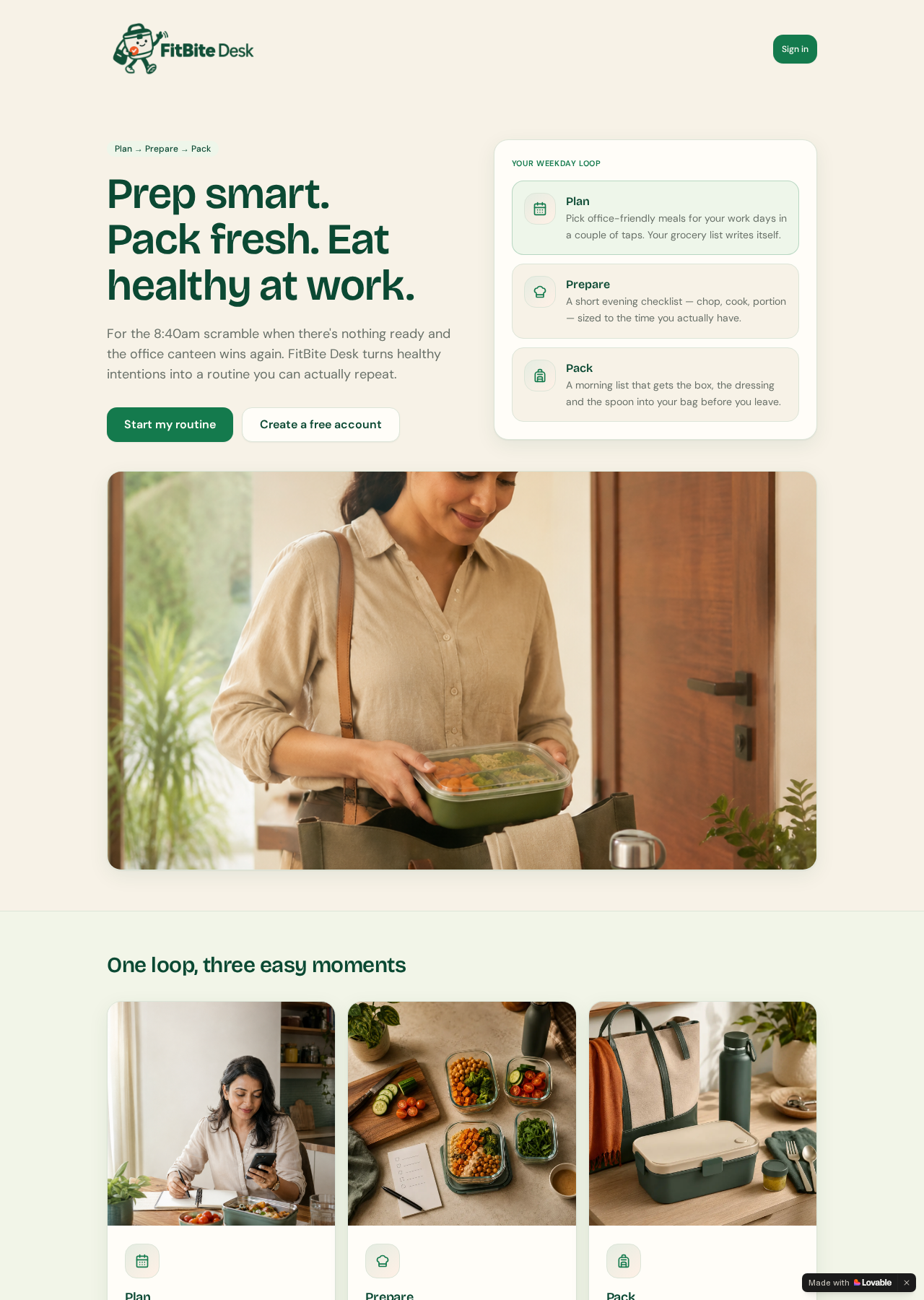
FitBite Desk landing page showing the Plan, Prepare and Pack weekday loop beside the product promise
The live FitBite Desk landing page introduces the routine before asking someone to create an account.

Summary

The 30-second read

What this project was and what I did — for anyone reviewing quickly.

Packing lunch for work sounds simple, but the decision is distributed across planning, evening preparation and morning packing.

I reframed the problem as one repeatable weekday routine: Plan → Prepare → Pack.

The product focuses on the next practical action instead of calorie counting or detailed health tracking.

FitBite Desk is now a live responsive product experiment; formal user-research results, production analytics and outcome metrics are not yet available.

Context

Where the product came from

Background, audience and the situation the design entered

FitBite Desk is a workplace meal-planning and habit-organisation product for busy office workers. I designed it around one repeatable behaviour loop — Plan → Prepare → Pack — so weekday lunch preparation feels like a calm sequence of small actions rather than another diet or calorie-tracking system.

Who uses it

Busy office workers who want to carry homemade lunches more consistently but need help coordinating decisions, groceries, evening preparation and morning packing across different moments of the day.

“A routine is easier to repeat when the interface does not make the user reconstruct it every time.”

Problem

The problem worth solving

What was working against the journey, for the business and the user

Busy office workers may want to carry a homemade lunch, but planning, evening preparation and morning packing happen at different moments — making it easy for good intentions to collapse into the office-canteen default.

Business pressures

  • Define a focused product proposition without drifting into a feature-heavy meal planner
  • Turn a small everyday problem into a coherent, live responsive product
  • Keep the product useful while maintaining clear non-medical boundaries

User pressures

  • Deciding what to carry before groceries and preparation can happen
  • Fitting chopping, cooking and portioning into end-of-day mental load
  • Remembering the meal, dressing, cutlery and supporting items in the morning

Friction in the journey

  • The decision is distributed across several moments rather than one continuous task
  • Evening preparation competes with fatigue and limited time
  • A missing small item can still break an otherwise prepared morning routine
  • Detailed tracking can add more cognitive load than the routine itself

Research

Research and diagnosis

Where the evidence came from and what it revealed

  • The live product and its public journey were reviewed across desktop and mobile
  • The product was framed around three observable moments of friction: planning, evening preparation and morning packing
  • The scope deliberately excludes calorie tracking, clinical guidance and medical outcomes
  • Formal user research and production analytics are not currently available and are not presented as evidence

Insights

What the research changed

The insights that shaped every design decision that followed

One outcome spans three moments

The lunch decision, preparation work and final packing do not happen together.

Design implication — Connect the moments through one memorable model while keeping each action short.

Preparation reduces morning pressure

Motivation alone cannot compensate for missing ingredients or unfinished preparation.

Design implication — Move meaningful effort to the evening and make tomorrow's task visible.

Memory needs external support

A prepared meal can still stay home when small supporting items are forgotten.

Design implication — Turn the final packing check into a visible, practical list.

More tracking is not always more support

Continuous measurement can make an everyday routine feel like another system to maintain.

Design implication — Keep the experience supportive, concise and focused on action rather than judgement.

Journey

The user journey

The path the design had to carry, and the structure behind it

  1. Plan
  2. Prepare
  3. Pack

01

Plan

Decide what to carry on office days.

  • Office-friendly meal selection
  • Simple planning
  • Grocery-list connection

Make the decision early enough for preparation to happen.

02

Prepare

Reduce tomorrow morning's workload.

  • Short evening checklist
  • Chop, cook and portion tasks
  • Preparation sized to available time

Move effort away from the rushed morning.

03

Pack

Leave home with everything needed.

  • Short morning packing list
  • Meal, dressing and cutlery
  • Visible supporting-item reminders

Turn memory into a visible checklist.

Information architecture

  • Landing and product proposition
  • Plan / Prepare / Pack explanation
  • Start routine or create account
  • Sign in or create account
  • Product experience
  • Privacy, Terms and Support

Primary user flow

  • Understand the three-stage routine
  • Choose to start
  • Sign in or create an account
  • Enter the product experience

Design decisions

How the design answers the problem

The decisions, the reasoning behind them, and what changed

Make the next action obvious

Minimal navigation, concise calls to action and repeated Plan → Prepare → Pack language keep people from reconstructing the routine each time.

Design for preparation, not motivation

The product moves attention from convincing someone to eat better toward making tomorrow's lunch easier to execute.

Calm by design, not another tracker

Short action lists, everyday portion cues and supportive language replace continuous measuring, logging and guilt-driven progress.

Keep architecture proportional

The public journey explains one model, offers a clear entry point and preserves the same promise through authentication instead of expanding into unnecessary features.

Before → after

Before

Before image

A healthy intention split across planning, evening preparation and morning memory.

Upload pending

After

After image

One visible Plan → Prepare → Pack routine with a clear next practical action.

Upload pending

Move the slider to weight the before or after description.

The weekday loop connects three moments of friction through one memorable product model.
Short lists and everyday guidance keep the experience calm rather than turning it into another tracker.
The live product states what it does not provide, making its health-adjacent boundary explicit.
The final call to action reinforces when the intended preparation behaviour begins.

Trust & safety

Useful without pretending to be medical

Responsible boundaries are part of the product design

Food and wellness interfaces can easily cross into medical-sounding guidance. FitBite Desk stays focused on habit and organisation, and the live product makes its limits explicit.

  • Helps people plan, prepare and pack homemade meals
  • Does not diagnose or treat medical conditions
  • Does not provide personalised medical advice
  • Uses mindful labels only as user-selected food preferences
  • Uses everyday portion cues rather than clinical prescriptions

When a product operates near health, trust also comes from being clear about what it does not do.

Visual system

Warm enough for food. Calm enough for routine.

The product interface stays supportive, practical and approachable

  • Warm cream surfaces and deep green brand colour
  • Soft green accents with rounded cards and controls
  • Generous spacing and simple iconography
  • Friendly lifestyle photography rather than performance-fitness imagery

Responsive design

One journey, every screen size

How the same decisions survive from phone to desktop

  • The live landing page reflows cleanly from a two-column desktop introduction to a single-column mobile sequence
  • Primary actions stack on narrow screens and remain large enough for touch
  • The weekday loop keeps its reading order and labels without horizontal scrolling
  • Text measure and image crops remain legible across the reviewed desktop and mobile views
On mobile, the product promise, actions and weekday loop reflow into one clear reading sequence.

Collaboration

Working with engineering and the business

Design was not complete at handoff — it continued through implementation

  • Defined the problem, scope and Plan → Prepare → Pack product model
  • Used AI to accelerate content exploration, structure and responsive implementation
  • Retained human ownership of hierarchy, wording, accessibility, health boundaries and final prioritisation

AI-assisted workflow

AI accelerated the build. Product judgement stayed human.

A real example of AI-assisted product building rather than AI-designed product direction

Frame

  • Define the problem and product scope
  • Set the three-stage mental model
  • Decide what not to build
  • Set the non-medical boundary

Explore

  • Compare content structures
  • Generate and edit alternatives
  • Refine UX copy
  • Identify edge cases

Build

  • Use Lovable to move from product direction into a responsive implementation

Review

  • Own hierarchy and UX decisions
  • Review wording and health boundaries
  • Check accessibility and visual quality
  • Make final prioritisation decisions

Ship

  • Publish a live, usable product experiment

Leadership

Leadership contribution

How the role raised the quality of the product and the team

  • Set the product direction and deliberately limited scope
  • Established responsible language for a health-adjacent experience
  • Reviewed AI-assisted output against product intent, accessibility and visual quality

Accessibility & QA

Accessibility and quality checks

What was checked, and what validation is still planned

Accessibility checks

  • Semantic headings and clear section labels create a readable hierarchy on the public landing page
  • Buttons and links have visible focus treatment and generous touch targets
  • Text and primary actions use strong green-on-cream contrast
  • The live mobile landing page was checked for responsive reflow with no horizontal scrolling
  • A full WCAG 2.2 AA audit, 200% zoom review and authenticated-flow validation remain improvement opportunities

Validation still required

  • Test whether people understand Plan → Prepare → Pack without explanation
  • Identify whether planning, evening preparation or morning packing breaks most often
  • Validate whether the evening checklist reduces next-morning effort
  • Review the authenticated core flow on mobile with real users
  • Check whether non-medical labels feel clear and trustworthy
  • Explore routine cues that support repeat use without becoming intrusive

Outcome

What is live now

What was designed, shipped and put in place for the future

  • Focused public product proposition
  • Plan → Prepare → Pack product model
  • Landing and conversion journey
  • Account entry and authentication
  • Clear non-medical product boundaries
  • Live responsive implementation

Evidence note: these are verified shipped elements, not claims about adoption, retention, behaviour change or health outcomes. Formal research and production metrics are not yet available.

Learnings

What this project taught me

Principles carried into the next piece of work

  • Narrow products can have strong product strategy because saying no to features protects the core behaviour.
  • Behaviour is often distributed across time; Plan, Prepare and Pack happen in different contexts.
  • Product copy is interaction design when it explains what should happen and when.
  • Responsible boundaries strengthen trust in health-adjacent products.
  • AI is most useful when scope, prioritisation, accessibility and quality still receive careful human judgement.

From everyday friction to a working product.

FitBite Desk gave me a compact environment to connect product thinking, UX writing, habit design and AI-assisted building in one live experience.

Open FitBite Desk
Contact me