eCommerce / Personalised Products / Custom Neon Signs
NeonChamp — eCommerce Experience and Customiser Redesign
The legacy custom-neon journey made the preview, pricing, options and primary actions compete for attention.
- Role
- UI/UX Technical Leader and Lead Designer
- Team
- Business stakeholders, development and testing teams
- Timeline
- Ongoing engagement
- Status
- Live
Summary
The 30-second read
What this project was and what I did — for anyone reviewing quickly.
NeonChamp sells products that customers create rather than simply select, making the customiser the centre of the buying experience.
The legacy journey asked users to manage the preview, typography, colour, size, physical options, price and primary action within one dense interface.
I led the UX and UI redesign around one direction: make the preview the anchor, sequence decisions around it, and keep price and the next action visible.
The redesigned black-theme experience launched across key website and customisation journeys.
Context
Where the product came from
Background, audience and the situation the design entered
NeonChamp sells custom neon signage, where the product is created by the customer rather than chosen from a shelf. Komal audited the existing experience, reorganised the customisation journey, designed the responsive website and customiser interfaces, and worked closely with business, development and testing teams. The launched black-theme experience established clearer hierarchy, a stronger brand direction and better desktop-to-mobile consistency.
Who uses it
Shoppers designing a personal or business sign — gift buyers, event planners, café and studio owners — most of them arriving on mobile, often unsure how their text will actually look when lit.
“In a customiser, the preview is the product. Everything else exists to serve it.”
Problem
The problem worth solving
What was working against the journey, for the business and the user
The legacy custom-neon journey made the preview, pricing, options and primary actions compete for attention.
Business pressures
- A distinctive brand presence in a crowded personalised-products market
- Consistent presentation across a growing catalogue of styles and sizes
- Fewer support conversations caused by unclear options and pricing
User pressures
- Understanding what the finished sign will look like before buying
- Following how each option changes the price
- Completing a long configuration comfortably on a phone
Friction in the journey
- Preview, controls and price all fighting for the same visual weight
- Option groups without a clear reading order
- Price changes that were easy to miss
- Primary action pushed below dense controls on small screens
Research
Research and diagnosis
Where the evidence came from and what it revealed
- Heuristic audit of the legacy customiser and product pages
- Review of the competitive landscape for custom-neon configurators
- Input from business, support and development teams on recurring customer confusion
- Structured walkthroughs of the end-to-end purchase path on mobile and desktop
Insights
What the research changed
The insights that shaped every design decision that followed
The preview is the product
Customers continuously check whether each choice produces the sign they imagined.
Design implication — Give the live preview the strongest and most stable position in the layout.
Choice becomes easier when it has sequence
Meaningful customisation should stay powerful without becoming a wall of equal-weight controls.
Design implication — Group related options and guide configuration progressively.
Feedback has to be immediate
Users should not search for the effect of changing size, style or an additional option.
Design implication — Connect selected states, preview and price feedback to every action.
Mobile needs continuity
Repeated scrolling between controls, preview, price and CTA increases cognitive effort.
Design implication — Preserve product context and keep the purchase action reachable.
Journey
The user journey
The path the design had to carry, and the structure behind it
- Discover a style
- Enter custom text
- Choose font, colour and size
- Review live preview and price
- Add to cart
- Checkout
Information architecture
- Home and inspiration entry points
- Style and category browsing
- Product detail with the customiser as the centre of the page
- Cart and checkout
- Support, delivery and care information
Primary user flow
- Entry (ad, search or browse)
- Style selection
- Text input
- Font / colour / size configuration
- Preview confirmation
- Price acceptance
- Add to cart
- Checkout
Design decisions
How the design answers the problem
The decisions, the reasoning behind them, and what changed
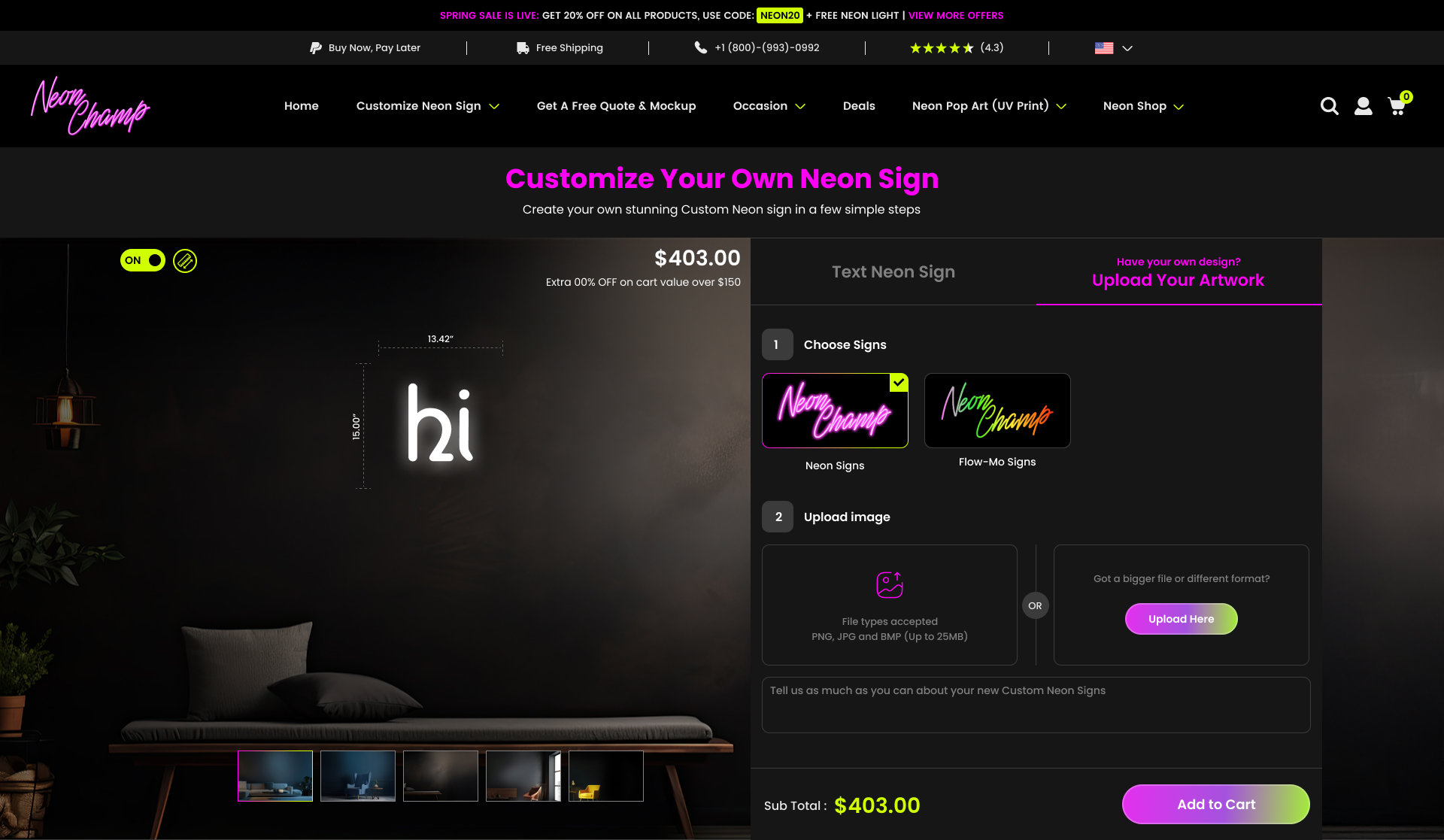
Preview as the anchor
The lit preview holds the strongest position on the page so the customer always sees the consequence of each choice.
Grouped, sequenced options
Configuration was reordered into a predictable sequence — text, then style, then size — instead of a flat wall of controls.
A persistent price and action
Price and the primary action stay reachable while the customer experiments with options.
A committed black theme
A dark surface lets neon colour do the work, giving the brand a distinct identity and improving contrast for the preview.
Before → after
Before
Competing preview, controls and pricing with no clear reading order.
Upload pending
After
A hierarchy that leads from preview to options to price to action, on any screen size.
Upload pending
Move the slider to weight the before or after description.
Responsive design
One journey, every screen size
How the same decisions survive from phone to desktop
- Mobile-first layout with the preview pinned above the option groups
- Touch targets sized for repeated adjustment
- Desktop layout that pairs preview and controls side by side without crowding
Collaboration
Working with engineering and the business
Design was not complete at handoff — it continued through implementation
- Worked with business stakeholders on catalogue and pricing rules
- Handed developer-ready specifications and reviewed implementation
- Partnered with the testing team on edge cases across devices
Two commercial journeys
This product carries two different purchase behaviours, measured separately.
Direct purchase
- Customiser
- Configuration
- Preview
- Cart
- Checkout
- Purchase
Sales-assisted quote
- Quote entry
- Requirements
- Artwork
- Submission
- Sales follow-up
- Order
Quote-to-order performance also depends on pricing, response time, customer budget and follow-up; it is not attributed entirely to UX.
Leadership
Leadership contribution
How the role raised the quality of the product and the team
- Led design direction end to end as UI/UX Technical Leader
- Aligned business, development and testing around a single journey
- Held UI quality reviews through implementation
Accessibility & QA
Accessibility and quality checks
What was checked, and what validation is still planned
Accessibility checks
- Contrast checked for text and controls against the dark surface
- Visible focus states across every configuration control
- Selection communicated by more than colour alone
- Labels and helper text written in plain language
Validation still required
- Usability testing on the revised customiser with first-time buyers
- Measuring configuration completion once analytics are in place
- Extending the pattern library to new product types
Measurement
Success Metrics & Projected Impact
How the redesign should be judged — defined as a framework, not claimed as results
Historical production analytics were unavailable for this project, so instead of presenting estimates as achieved results I built a normalised 100,000-session funnel model. It defines how the redesign should be measured and what level of improvement each intervention was designed to influence. NeonChamp's sales-assisted Free Quote & Mockup journey is treated as a separate funnel rather than mixed with ecommerce purchases.
+7 pp
Artwork upload completion
74% → 81%
+4 pp
Customisation completion
60% → 64%
+7 pp
Quote form completion
58% → 65%
+2 pp
Checkout completion
55% → 57%
+0.3 pp
Mobile purchase conversion
2.2% → 2.5%
~+15.5%
Projected purchase volume / 100K sessions
2,960 → 3,419 purchases
Scenario-based estimates used to define success criteria; historical analytics were unavailable. These are measurement targets, not verified production results.
Supporting measurement targets
- Add-to-Cart after customisation: 69% → 71%, worth roughly 800 additional cart additions per 100K sessions once more customers finish configuring.
- Checkout abandonment: 45% → 43%, and cart abandonment 64.3% → 62.4%, through earlier delivery clarity, consistent final pricing and better payment-error recovery.
- Coupon failure: 11% → 8% and payment errors 6.5% → 5.0%, treated as checkout diagnostics rather than headline numbers.
- Add-on adoption: 24% → 27%, measured only alongside conversion and revenue per session so an upsell can never be optimised on its own.
- Configuration time: 7.0 → 6.4 minutes, paired with completion and option backtracking so speed is never pursued at the cost of confidence.
- Customisation and checkout support contacts: 13 → 11.5 per 100 orders, dependent on support-ticket tagging before it can be validated.
In a normalised 100K-session scenario, these funnel improvements model approximately 15.5% more completed purchases and around 19.6% higher revenue when combined with a modest AOV increase from $225 to $233. Quote-to-order performance depends on sales response, pricing and follow-up, so it is never attributed to the redesign alone.
Outcome
What changed
What was designed, shipped and put in place for the future
- A launched black-theme experience with clearer visual hierarchy
- A stronger, more recognisable brand direction
- Improved consistency between desktop and mobile journeys
- A reusable structure for adding new styles and options
Evidence note: outcomes described here are qualitative. Historical production analytics were unavailable, so any figures in the measurement section are scenario-based success criteria rather than measured results.
Learnings
What this project taught me
Principles carried into the next piece of work
- In customisation, the preview is the product — everything else is supporting cast.
- Sequencing options reduces confusion more than adding explanation.
- A committed visual theme can carry both brand and legibility if contrast is respected.